
New
-
Power Saving Management v2 is available for D7X devices.
-
Standby Mode and Sleep Mode is only available for the following D7X devices:
- DTEN D7X 55 Windows Edition 3.6.0 or later
- DTEN D7X 75 Windows Edition 3.6.0 or later
-
Deep Sleep Mode is only available for the following D7X devices:
- DTEN D7X 55 Windows Edition 3.1.4 or later
- DTEN D7X 75 Windows Edition 3.1.4 or later
- DTEN D7X 55 Android Edition 1.3.5 or later
- DTEN D7X 75 Android Edition 1.3.5 or later
-
Standby Mode and Sleep Mode is only available for the following D7X devices:
-
If you enable DTEN Power Saving Management, it is recommended to disable the Zoom Device Operation Time or Microsoft Teams Rooms Office Time settings.
- For detailed instructions on disabling these settings, please refer to:
Zoom Device Operation Time Office Hour on MS Teams Admin Center
- For detailed instructions on disabling these settings, please refer to:
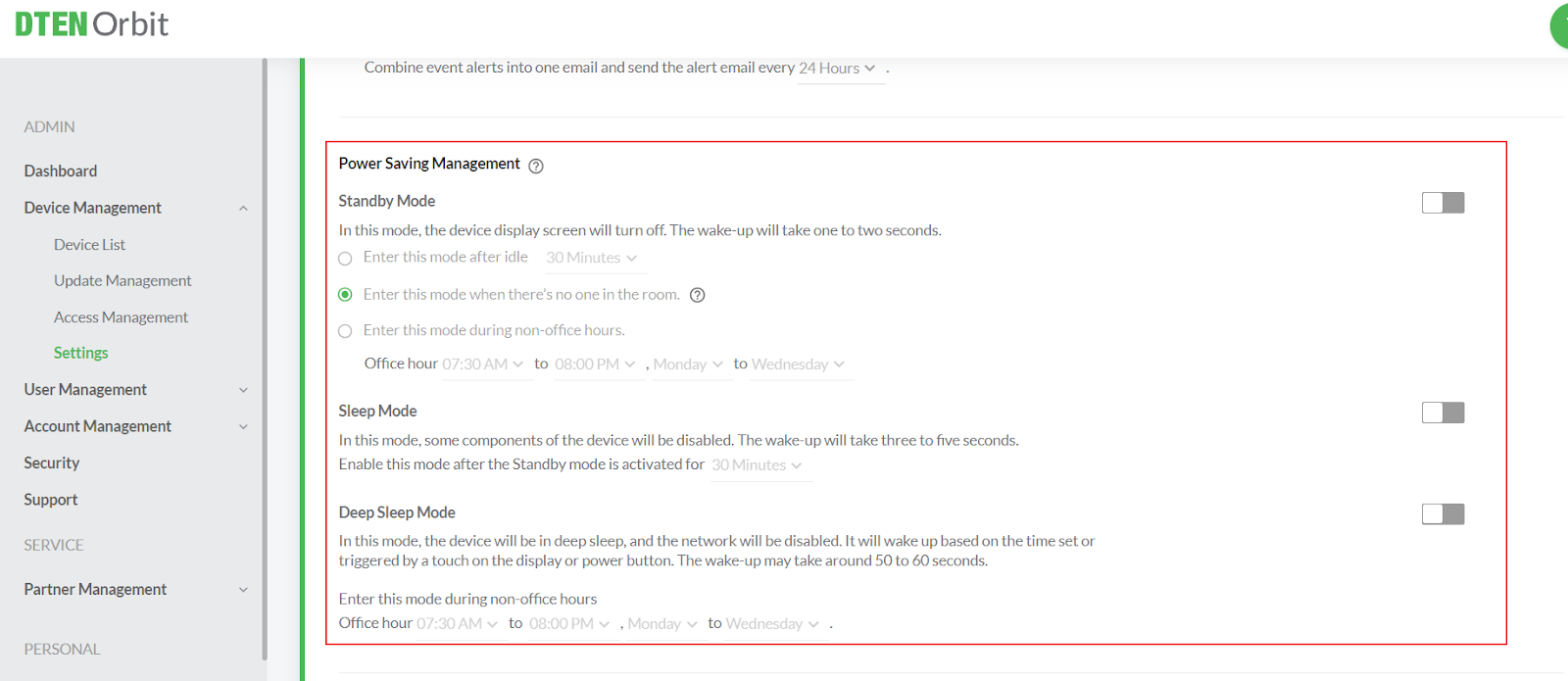
Modified
- n/a
Resolved
- n/a
Known Issue
- n/a
Was this article helpful?
That’s Great!
Thank you for your feedback
Sorry! We couldn't be helpful
Thank you for your feedback
Feedback sent
We appreciate your effort and will try to fix the article