

Overview
This article details what the SNMP (Simple Network Management Protocol) service in Windows OS will support and the SNMP service will not support for DTEN products.
Supporting Product
- DTEN D7X Windows
- DTEN D7
Windows OS SNMP Service
What Windows OS SNMP Service Supports
The SNMP (Simple Network Management Protocol) service in Windows OS provides several functionalities to help monitor and manage network devices. Here’s an overview of what it supports:
- Basic SNMP Protocol Support
- SNMP Versions: Supports SNMPv1 and SNMPv2c. These versions provide basic monitoring and management capabilities with community string-based authentication.
- MIBs (Management Information Bases): Supports a range of standard MIBs and allows querying of these MIBs to retrieve device information. Custom MIBs can also be loaded.
- Monitoring and Management Capabilities
- Performance Metrics: Collects and reports various performance metrics such as CPU usage, memory usage, disk space, and network interface statistics.
- Device Information: Provides detailed information about the device, including hardware and software configurations, uptime, and status.
- SNMP Traps
- Trap Reception: You can receive SNMP traps from network devices, which are notifications about specific events like device failures, threshold breaches, or status changes.
- Trap Configuration: Allows configuration of SNMP trap destinations to specify where traps should be sent.
- Community Strings
- Community Strings Configuration: This allows the configuration of community strings for basic read and write access control. These strings act as passwords to access SNMP data.
- Integration with Network Management Systems
- Interoperability: It works with various network management systems (NMS), such as SolarWinds, PRTG Network Monitor, and others, to provide a centralized view of network health and performance.
- Standard Interfaces: Uses standard interfaces and protocols to ensure compatibility with third-party SNMP tools and systems.
What Windows OS SNMP Service Does Not Support
Despite its functionalities, the Windows OS SNMP service has several limitations. Here’s what it does not support:
-
Advanced Security
- SNMPv3: This does not support SNMPv3, which provides enhanced security features like user-based authentication and encryption. This leaves SNMP traffic susceptible to interception and tampering when using SNMPv1 or SNMPv2c.
- Advanced Network Management Features
- Topology Discovery: This does not natively support network topology discovery and mapping. Additional tools and protocols are required to visualize network topology.
- Configuration Management: Lacks comprehensive configuration management capabilities such as bulk configuration, templating, and version control.
- Real-Time Capabilities
- Low-Latency Monitoring: SNMP polling intervals may not suffice for environments requiring real-time monitoring and response. It is not designed for low-latency, high-frequency data collection.
- Immediate Response Actions: Limited ability to trigger immediate automated responses beyond sending SNMP traps.
- Detailed Application Monitoring
- Application-Specific Metrics: This metric primarily focuses on hardware and network-level metrics rather than detailed application performance monitoring. It does not provide deep insights into application-level metrics.
- Advanced Analytics and Reporting
- High-Level Analytics: This does not offer built-in high-level analytics or business intelligence capabilities. Raw data collection is supported, but advanced analysis requires third-party tools.
- Rich Visualization: Lacks built-in advanced visualization tools or dashboards. Visualization and reporting are typically handled by external network management solutions.
- Granular Access Control
- Detailed Permissions: Community strings provide basic access control but lack the granularity of more advanced permission settings found in SNMPv3.
- Ease of Use and User Interface
- Intuitive GUI: Does not provide an intuitive graphical user interface for managing SNMP settings. Configuration is often done through more complex interfaces like the command line or registry settings.
- Integration and Automation
- Modern IT Environments: Limited integration capabilities with modern IT service management (ITSM) tools, cloud environments, or DevOps pipelines. Requires additional middleware or custom solutions for seamless integration.
- Advanced Automation: This does not natively support complex automation workflows, policy-based management, or automated remediation processes.
D7X Windows SNMP Setup Instructions
-
Switch Zoom/Teams UI to Windows OS UI
-
Ensure Windows Update service is running:
Press Win + R, type "services.msc" and press Enter
Find "Windows Update" in the list
Double-click it and set "Startup type" to "Automatic"
Click "Start" under "Service status"
Click "Apply" and "OK"
-
Run PowerShell as administrator and try running the Add-WindowsCapability command:
powershell Add-WindowsCapability -Online
-
Open PowerShell as administrator and run the following command:
Add-WindowsCapability -Online -Name "SNMP.Client~~~~0.0.1.0"
-
To add the WMI SNMP Provider feature, run:
Add-WindowsCapability -Online -Name "WMI-SNMP-Provider.Client~~~~0.0.1.0"
-
Configure SNMP Service
Press Win + R, type "services.msc" and press Enter
Select SNMP Service, right-click and choose Properties
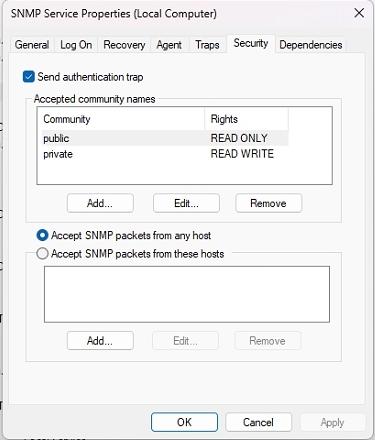
In the Properties window, switch to the Security tab. Configure Accepted community names as follows:
Set Community rights: READ ONLY to "public"
Set Community rights: READ WRITE to "private"
Then, configure either "Accept SNMP packets from any host" or "Accept SNMP packets from these hosts" based on your preference.
-
Go back to Zoom/Teams UI
Here is a list of generic MIBs exported from our operating system for your reference:
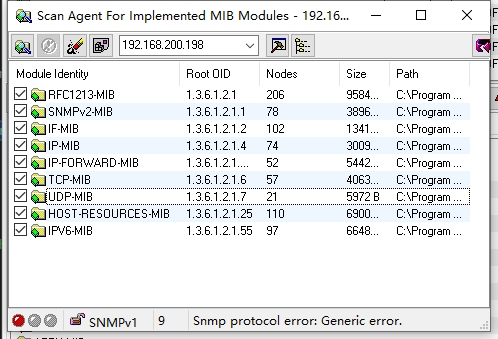
Module Identity Root OID Nodes Size Path
------------------- ----------------- ------ --------- --------- ---------------------------------------------------------------------
RFC1213-MIB 1.3.6.1.2.1 206 95841 B C:\Program Files (x86)\MG-SOFT\MIB Browser\MIB\SMIDB\RFC1213-MIB.smidb
SNMPv2-MIB 1.3.6.1.2.1.1 78 38961 B C:\Program Files (x86)\MG-SOFT\MIB Browser\MIB\SMIDB\SNMPv2-MIB.smidb
IF-MIB 1.3.6.1.2.1.2 102 134189 B C:\Program Files (x86)\MG-SOFT\MIB Browser\MIB\SMIDB\IF-MIB.smidb
IP-MIB 1.3.6.1.2.1.4 74 30090 B C:\Program Files (x86)\MG-SOFT\MIB Browser\MIB\SMIDB\IP-MIB.smidb
IP-FORWARD-MIB 1.3.6.1.2.1.4.24 52 54424 B C:\Program Files (x86)\MG-SOFT\MIB Browser\MIB\SMIDB\IP-FORWARD-MIB.smidb
TCP-MIB 1.3.6.1.2.1.6 57 40630 B C:\Program Files (x86)\MG-SOFT\MIB Browser\MIB\SMIDB\TCP-MIB.smidb
UDP-MIB 1.3.6.1.2.1.7 21 5972 B C:\Program Files (x86)\MG-SOFT\MIB Browser\MIB\SMIDB\UDP-MIB.smidb
HOST-RESOURCES-MIB 1.3.6.1.2.1.25 110 69003 B C:\Program Files (x86)\MG-SOFT\MIB Browser\MIB\SMIDB\HOST-RESOURCES-MIB.smidb
IPV6-MIB 1.3.6.1.2.1.55 97 66489 B C:\Program Files (x86)\MG-SOFT\MIB Browser\MIB\SMIDB\IPV6-MIB.smidb
If you have additional questions or need to contact DTEN Support, please refer to this DTEN Knowledge Base article for more details: HERE.
Was this article helpful?
That’s Great!
Thank you for your feedback
Sorry! We couldn't be helpful
Thank you for your feedback
Feedback sent
We appreciate your effort and will try to fix the article