
What do I need?
-
A Windows-layout wired keyboard.
Switching Between Users
- Please plug in the Windows-layout wired keyboard onto the PC's blue USB port (the rear, top-left port).
- Press Ctrl + Alt + Delete and you will see the following screen.
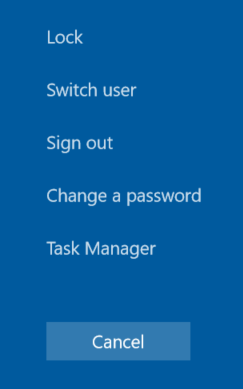
- Please click on “Sign Out”.
- You will be brought to the Windows lock screen.
- Please select “ZoomAdmin” as the account to log in to Windows 10.
- You will then see the prompt to log in to “ZoomAdmin”. Please enter the password Zoom1234 and log in.
- Once you have logged in to Windows 10, please click on the “Search”-icon (The magnifying glass).
- Type in “Date & Time” to pull up the Date and Time settings.
- Click on “Change the Date and Time”
- You can now manually change the time by switching the "Set automatic time"-toggle to off
If you have additional questions or need to contact DTEN Support, please refer to this DTEN Knowledge Base article for more details: HERE.
Was this article helpful?
That’s Great!
Thank you for your feedback
Sorry! We couldn't be helpful
Thank you for your feedback
Feedback sent
We appreciate your effort and will try to fix the article