
Part 1: To join a domain, you have to make a registry change first:
- Plug in a Windows USB Keyboard to the Blue colored USB ports, press “Ctrl+Alt+Del”, and click Sign Out, Go to ZoomAdmin with Password “Zoom1234
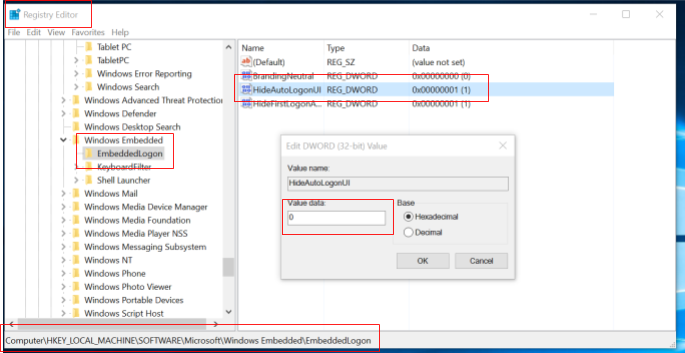
- Go to Registry Editor, under
Computer\HKEY_LOCAL_MACHINE\SOFTWARE\Microsoft\Windows Embedded\EmbeddedLogon
Change value from 1 to 0 for HideAutoLogonUI option will prevent the black screen from joining the domain.
Part 2: To join a computer to a domain
-
On the Start screen, type Control Panel, and then press ENTER.
-
Navigate to System and Security, and then click System.
-
Under Computer name, domain, and workgroup settings, click Change settings.
-
On the Computer Name tab, click Change.
-
Under Member of, click Domain, type the name of the domain that you wish this computer to join, and then click OK.
-
Click OK, and then restart the computer.
If you have additional questions or need to contact DTEN Support, please refer to this DTEN Knowledge Base article for more details: HERE.
Was this article helpful?
That’s Great!
Thank you for your feedback
Sorry! We couldn't be helpful
Thank you for your feedback
Feedback sent
We appreciate your effort and will try to fix the article