
If you have more than one DTEN device in your network, you might find yourself wanting to rename them for better management.
You can do this as follows:
- Please plug in the Windows-layout wired keyboard onto the PC's blue USB port (the rear, top-left port).
- Press Ctrl + Alt + Delete and you will see the following screen and you will be brought to the Windows lock screen.
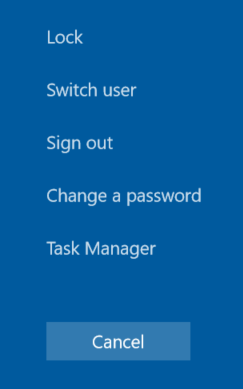
- Please click on “Sign Out” and select "Zoom Admin"
Please note: Zoom Rooms will start one more time. To exit Zoom Rooms, tap on the screen and press on "Exit" on the bottom left.
The passwords for the account is:
- ZoomAdmin (access to the PC) - Zoom1234
Once you are in Windows:
Go to Settings > System > About and select the Rename PC button in the right column under PC. Then type the name you want to rename the computer.
If you have additional questions or need to contact DTEN Support, please refer to this DTEN Knowledge Base article for more details: HERE.
Was this article helpful?
That’s Great!
Thank you for your feedback
Sorry! We couldn't be helpful
Thank you for your feedback
Feedback sent
We appreciate your effort and will try to fix the article