
Overview
This document provides a detailed description of the following DTEN service:
- Mission Control
This article covers:
- Types of devices that are compatible with Mission Control and minimum requirements
- Security methods used to protect device(s) and data during a Mission Control session
- Protection of privacy during a Mission Control session
- The definition of Mission Control
- Explanation of how the process of implementation works and operations that can be performed
Prerequisites
The minimum DTEN firmware versions to support the features described in this article are listed below. DTEN recommend customers to update their DTEN firmware to the latest versions above the ones listed below:
- DTEN D7 55 S1 - minimum v1.6.1: HERE
- DTEN D7 55 S2 - no minimum firmware requirements
- DTEN D7 75 - minimum v2.3.0: HERE
- DTEN ME, ME Pro - no minimum firmware requirements
- DTEN ON 55 - latest firmware version recommended
- DTEN ONboard - latest firmware version recommended
- DTEN D7X Windows & Android - latest firmware version recommended
- DTEN Bar - latest firmware version recommended
Security and Privacy
Encryption and Authentication Methods
- Advanced Encryption Standard (AES). The security between the device and the server is ensured through the two-way authentication of the DTEN private digital certificate.
Security and Data Transfer
- Sensitive data is stored with encryption. All data is hosted on the AWS cloud platform.
- The data output process is fully encrypted.
Privacy Policy
- We will not collect and store any private information other than the customer's email address.
-
We will record the screen throughout the use process to ensure the traceability of the operation process.
Port Information:
Openfire:5222,5223.
MQTT: 8000,8001.
Orbit:443.
UDP:50000-65000.
What is DTEN Orbit Mission Control?
DTEN Orbit Mission Control is a remote technical resolution service that aims to optimize the efficiency of DTEN IT effort by speeding up the resolution time. In addition, with DTEN customer’s initiation and approval, the service allows DTEN Support technicians to diagnose DTEN devices to perform diagnostics tests and troubleshooting without needing to dispatch personnel on-site.
To ensure security and privacy of your DTEN devices, this service requires a unique key and authorization from you every time before access from any DTEN Support technicians.
How Does It Work?
Initiation by DTEN Technician
When a customer contacts DTEN support, depending on the issue, a DTEN Support technician may determine whether Mission Control is needed to help address the customer’s problem and resolve the open support ticket. To initiate Mission Control, the customer must provide authorization.
When a call for support is received and it is determined that remote access is necessary to resolve the issue, a DTEN Support technician will email a Mission Control authorization request letter to the customer that contains a Go Authorize link (Figure 1). When the customer clicks this link, it will open to the Orbit website and display the open ticket. When the customer hovers the mouse pointer over the ticket, an Approve and a Reject button will display.. Once the customer clicks on the Approve button (Figure 2), the authorization is complete and a confirmation email will be sent to the customer.
Initiation by Customer
The customer can alternatively add a ticket directly into Orbit, and provide authorization for Mission Control during that process. Instructions on how to do so are available HERE. While adding the ticket, the customer is able to select the device that is having an issue, describe the problem and indicate a date range and preferred time to receive remote assistance. Once the ticket is submitted, the customer will receive a confirmation letter.
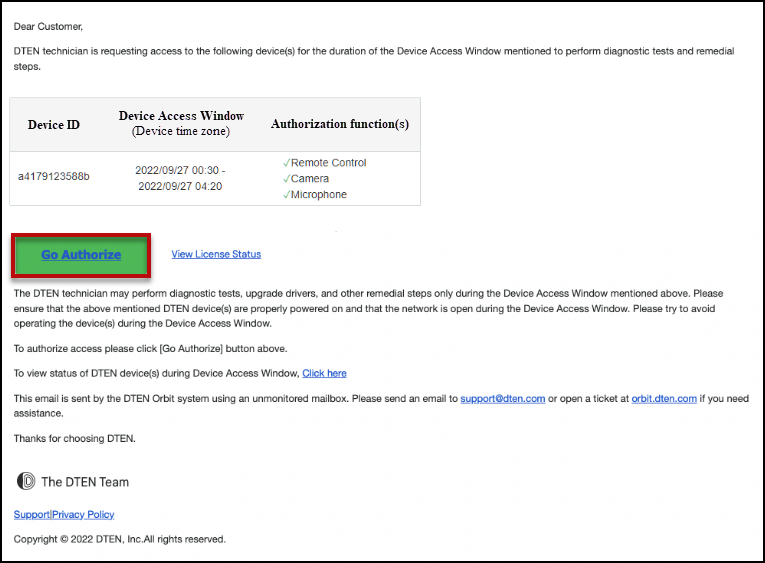
Figure 1. Go Authorize link
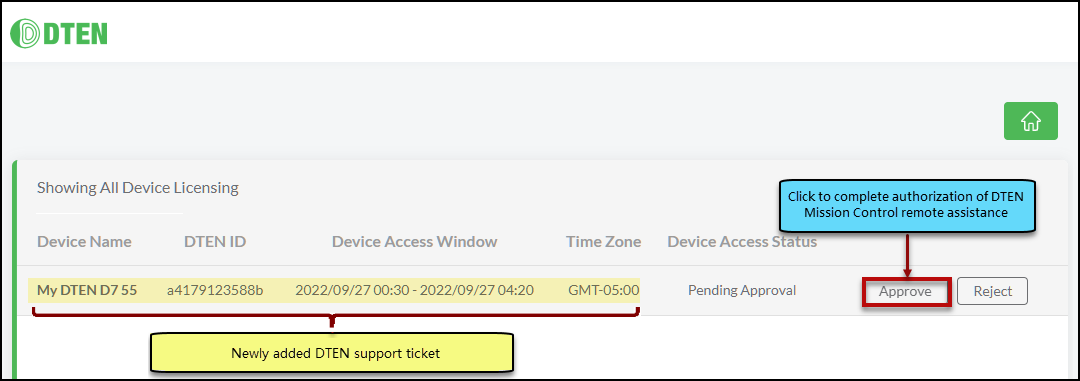
Figure 2. Approve button
Successful Mission Control Connection
Once connected, the customer will see the following items displayed (Figure. 3).
- Orbit Mission Control Overlay Title - confirms that a Mission Control session is active
- Overlay Message “Remote Service in Progress” - also confirms active session
- Stop Service button - enables customer to disconnect remote access
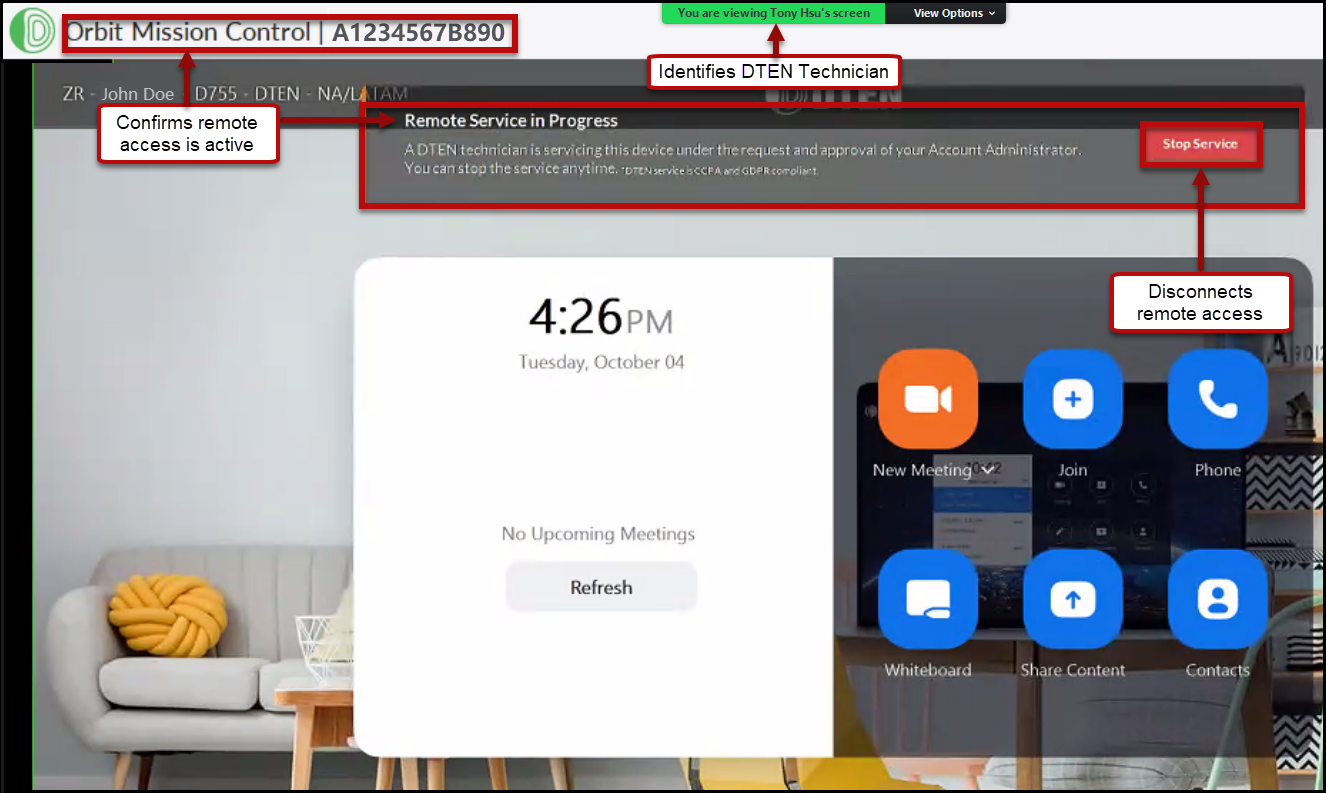
Figure 3. Initial Mission Control screen on customer’s pc/device
Operations that Can Be Performed Via Mission Control
When servicing a D7-55 device, DTEN technicians will be able to:
- Access the system desktop
- Shutdown and Restart the device
- Access management tools and software, such as: Device Manager, Device drivers (for touchscreen, microphone, camera, network settings, etc.).
- Access log captures (extract DTEN and Zoom logs)
- Perform updates, including DTEN firmware & Zoom App updates
- Perform actions in Zoom, such as: Join/end meeting, test audio/video and record results.
When servicing a ME/ME Pro device, DTEN technicians will be able to:
- Access the system dashboard
- Shutdown/Restart the device
- Access and adjust network settings.
- Perform actions in Zoom, such as: Join/end meeting, test audio/video and record results
Visual Examples of Access:
Accessing files and folders (Figure 4).
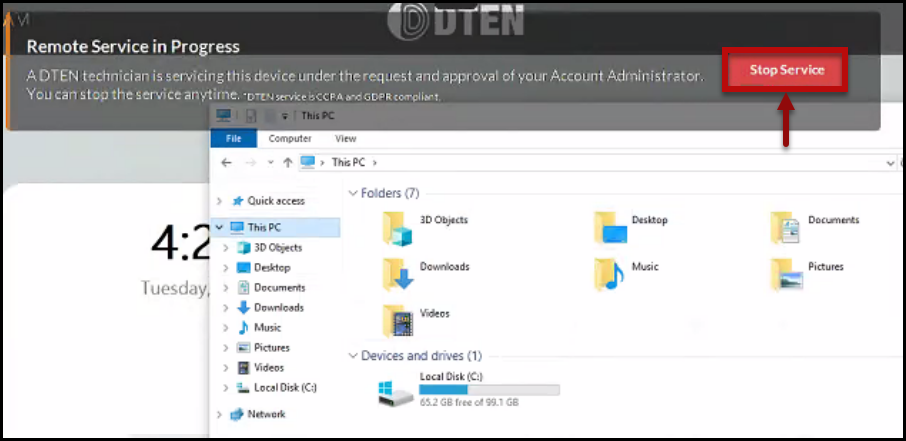
Figure 4. Files and folders being accessed remotely by DTEN Technician
Accessing devices and settings (Figure 5).

Figure 6. Stop Service button
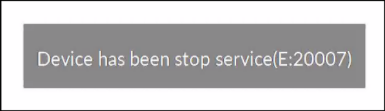
Figure 7. Confirmation of disconnection
If you have additional questions or need to contact DTEN Support, please refer to this DTEN Knowledge Base article for more details: HERE.
Was this article helpful?
That’s Great!
Thank you for your feedback
Sorry! We couldn't be helpful
Thank you for your feedback
Feedback sent
We appreciate your effort and will try to fix the article