
Overview
The instructions below may help with the new ePTZ feature of DTEN firmware v1.5.0 release.
DTEN ePTZ Function
The new firmware v1.5.0 for DTEN D7 55” has a new ePTZ-enabled Zoom Rooms function. (Note: The functionality of the ePTZ will vary based on hardware.)
-
Video demonstration of how ePTZ function works during a meeting: HERE
How do I access this feature?
1. When in the meeting, click Vertical Ellipsis (three dots) at the bottom right corner

2. Click Camera Control on a pop-up menu to open up ePTZ-enabled Zoom Rooms (see below)
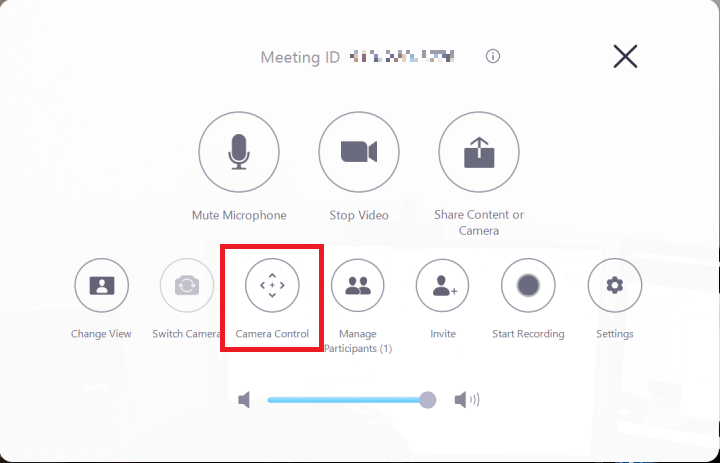
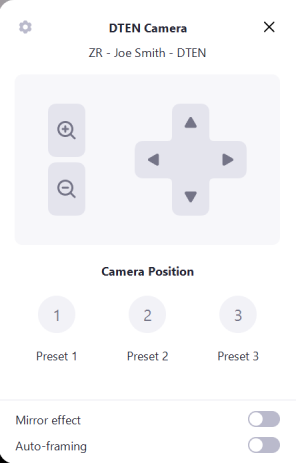
3. This will pull up the Camera Control, Auto Framing and Preset options explained in more detail below.
This feature has the following hardware/ software version dependencies:
| Dependencies | Requirement |
| DTEN Software Dependencies | DTEN 1.5.0 |
| DTEN Hardware Dependencies | NO |
| Zoom Room Dependencies | NO |
If you have additional questions or need to contact DTEN Support, please refer to this DTEN Knowledge Base article for more details: HERE.
Was this article helpful?
That’s Great!
Thank you for your feedback
Sorry! We couldn't be helpful
Thank you for your feedback
Feedback sent
We appreciate your effort and will try to fix the article